Completing a task
Tap the checkbox. You'll get a little celebration and a Completed message with Undo.
You can also swipe a task all the way to the right to mark it done (in My Day and your lists).
Completing it on a different day
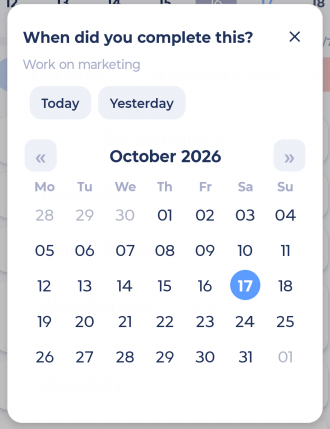
Did it yesterday but forgot to tick it off? Press and hold the checkbox. Marvin asks When did you complete this?. Tap Today, Yesterday or pick a date.
Un-completing
Tap the checkbox again, or tap Undo right after completing.
Choosing your celebration
Go to More > Features > Check Off Behavior to choose the animation (Explode, Dancing Marvin, Confetti or None), a completion sound and its volume.
Seeing what you've done
On My Day, pull the list up past the bottom, or tap ⋮ > View completed. You'll see everything completed that day and a chart of the time you tracked.
Screenshot to add: The completed tasks screen with the time chart
Want completed tasks to stay visible in the list instead? Turn on Show completed inline in More > Features > Completed Tasks.
Completing projects
Open the project and tap the Complete pill.