Open the sidebar, tap Account & Settings, then Account.
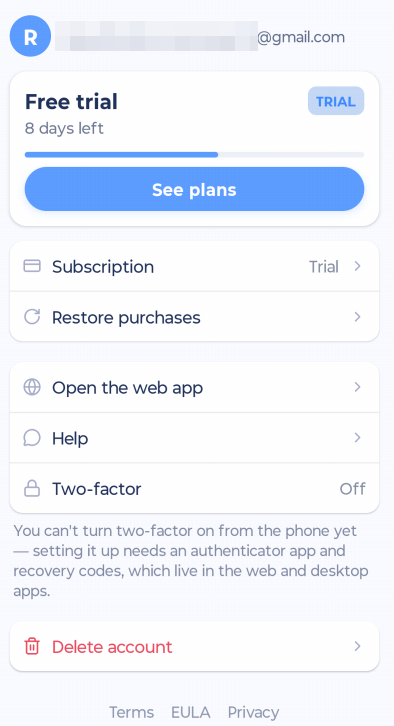
What you'll find here
Your name and email
Your plan: free trial, paid, lifetime, or managed by your team, and when it renews or ends
See plans: subscribe or switch plans
Manage subscription: opens Apple, Google Play or amazingmarvin.com, depending on where you subscribed
Restore purchases: finds an App Store or Google Play subscription again, for example on a new phone
Open the web app
Help
Two-factor: see whether two-factor authentication is on
Delete account
Links to the Terms, EULA and Privacy Policy, and your app version
More about plans in Your free trial and subscribing on your phone.
Two-factor authentication
You can turn two-factor authentication off on your phone (you'll need your password). To turn it on, use the web or desktop app.
Logging out
Sidebar > Account & Settings > Logout (under Data).
Deleting your account
Tap Delete account, enter your password and tap Delete forever. This can't be undone.
Deleting your account does not cancel a subscription you bought through the App Store or Google Play. Cancel it there first with Manage subscription.